
Mobile-first petrol pump control

Petrol Pump Mobile App for Owners and Managers

See how a petrol pump mobile app helps owners and managers monitor shifts, sales, staff, customers, invoices, reports, and daily activity from anywhere.

Owner Guides Mobile App
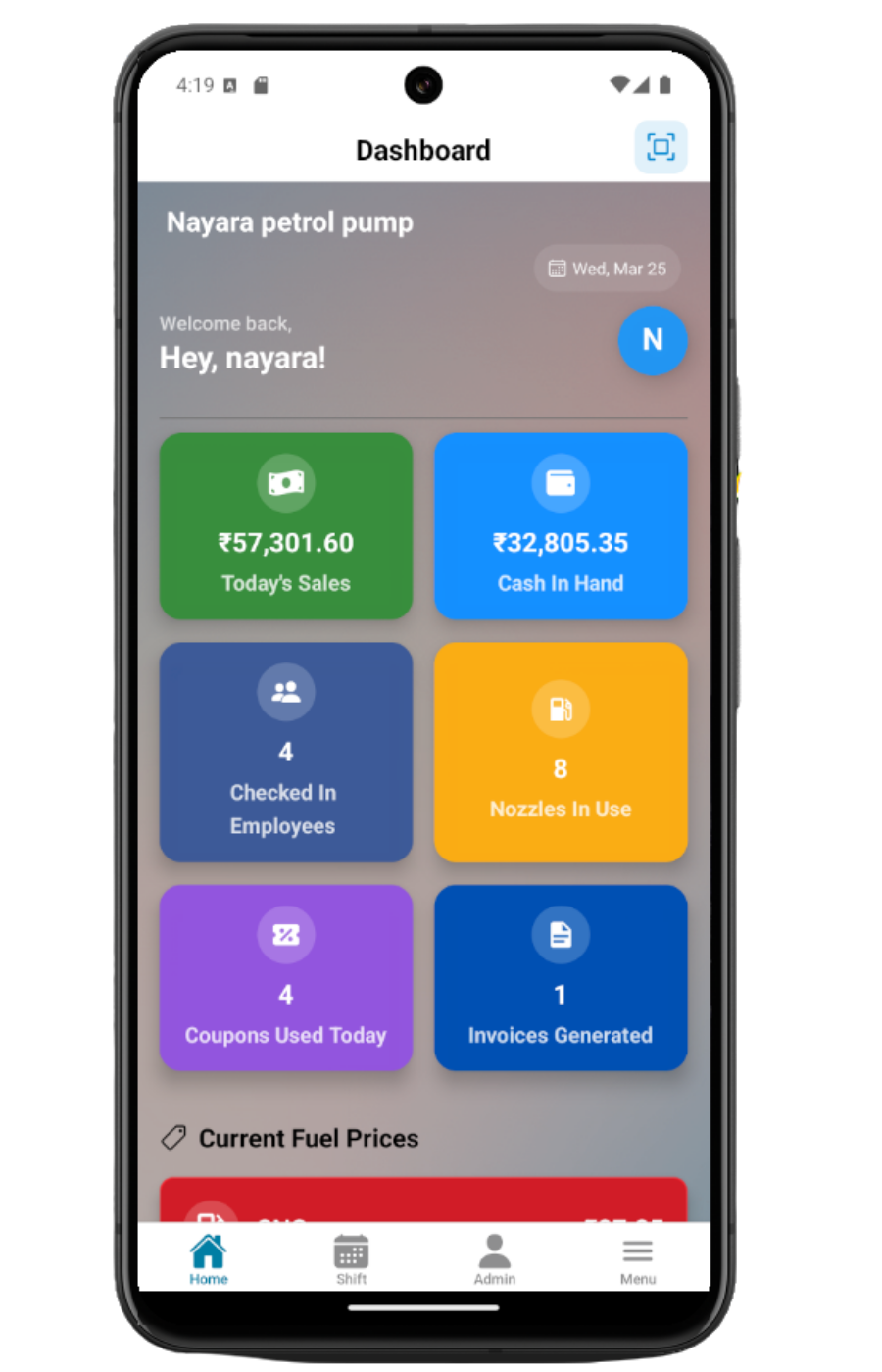
Petrodweep mobile dashboard showing sales, cash, employees, nozzles, coupons, and invoices
Owner dashboard view in the Petrodweep mobile app

A petrol pump owner cannot always sit in the office to check registers, sales, stock, staff, or collections. A mobile app gives owners and managers a faster way to monitor daily operations, open important records, and respond before small issues become end-of-day surprises.

Owner view

Daily sales, cash, coupons, invoices, and pump activity in one dashboard.

Manager flow

Shift check-in, staff activity, readings, and approvals stay close at hand.

Field tools

QR scanning, invoice sharing, card lists, and role-based menus work from mobile.

What owners should expect from a mobile app

The mobile app should give a clear operational snapshot without forcing the owner to open many reports. The most useful information is usually current shift activity, total sales, cash in hand, nozzles in use, coupons used, invoices generated, and pending approvals.

Mobile access should follow roles

A mobile app is powerful only when access is controlled. Owners need broad visibility, managers need shift and staff tools, employees need their assigned workflows, and customers may need limited coupon or account access. Role-based navigation keeps the app practical and safer.

The best mobile workflows are quick

Mobile screens should be designed for the petrol pump environment. Common tasks such as checking a dashboard, opening a coupon, viewing an invoice, reviewing current shift details, recording a payment, or checking reports should take a few taps.

  • Dashboard cards for important numbers.
  • QR scan for coupons and invoices.
  • Card-style lists instead of wide desktop tables.
  • Fast refresh after save or edit.
  • Share options for invoices and reports.

Mobile does not replace the web dashboard

Owners often need both. The web dashboard is better for large-screen review, setup, and detailed administration. The mobile app is better for quick monitoring, approvals, field usage, and follow-up while away from the office.

Mobile app checklist for owners

Owner dashboard with sales, cash, nozzles, coupons, and invoices
Current shift and shift check-in visibility
Credit customer coupons and invoice access
QR scan for faster coupon or invoice lookup
Report access for daily sales, fuel, attendance, and profit
Mobile sharing for invoice PDFs
Role-based menu for admins, managers, employees, and customers

How Petrodweep helps on mobile

  • Petrodweep includes a React Native mobile app for owner, manager, employee, customer, and tanker-related workflows.
  • The mobile dashboard shows operational summaries while deeper pages handle shifts, reports, coupons, invoices, tasks, and profile workflows.
  • The app includes mobile-specific tools such as QR scanning, invoice sharing, card lists, and role-based mobile menus.

Frequently asked questions

Can an owner monitor the pump without being at the pump?

Yes, if the pump uses cloud software and staff record daily operations in the system. The owner can then review dashboard numbers, reports, invoices, and shift activity from mobile.

Should employees also use the mobile app?

Employees can use the mobile app when the pump wants controlled workflows for check-in, assigned tasks, or shift-related actions. Access should be limited by permissions.

Why is QR scanning useful at a petrol pump?

QR scanning helps attendants open coupon or invoice records quickly, reducing manual search and improving verification at the forecourt.

Related resources

Web Dashboard Docs

Web Dashboard Getting Started

Learn how petrol pump owners and managers should start using the Petrodweep web dashboard for daily operations, setup, reports, users, and role-based navigation.

Read next

Web Shift Docs

Shift Check In

Document the Petrodweep web shift check-in workflow for selecting date and shift, adding employees, assigning nozzles and card machines, and approving shift entries.

Read next

Web Billing Docs

All Invoices and Invoice Detail

Document the Petrodweep invoice list and invoice detail workflow for reviewing invoice header details, line items, coupons, pending invoices, totals, payments, print, email, and undo actions.

Read next

Software Selection

Best Petrol Pump Software

A practical guide for Indian petrol pump owners comparing petrol pump management software for billing, shifts, credit customers, inventory, reports, and mobile access.

Read next

Ready to move your petrol pump workflows into Petrodweep?

Talk to our team about your current registers, reporting process, credit customer workflow, and staff roles. We will show the relevant Petrodweep flow in a demo.