
Owner dashboard guide

Petrol Pump Owner Dashboard: What It Should Show

Guide for petrol pump owners on the dashboard numbers, alerts, reports, and drill-downs that matter for daily control.

Owner Guides Owner Dashboard 8 min read
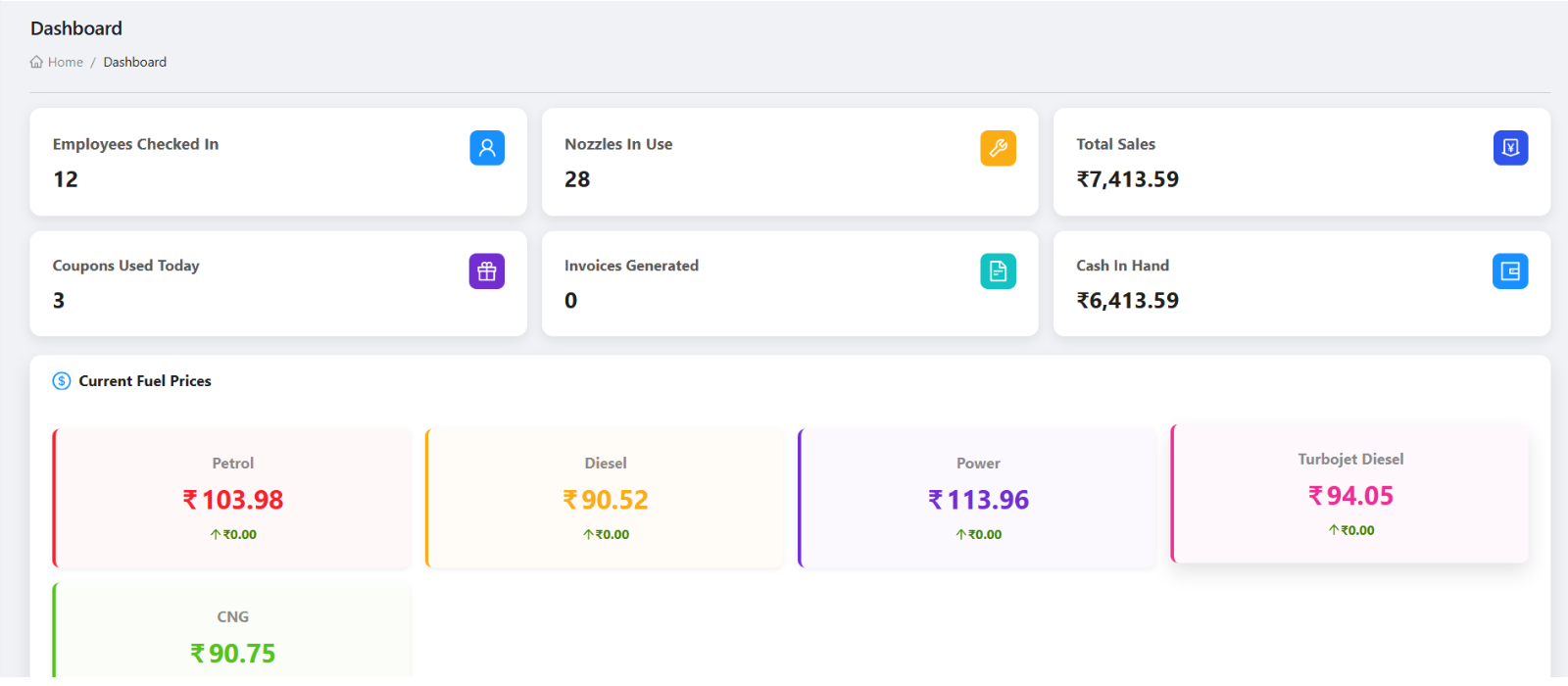
Petrodweep owner dashboard showing petrol pump operations
A useful owner dashboard shows summary signals and lets owners open the source records.

A petrol pump owner dashboard should make daily control faster. It should not only show attractive cards. It should help the owner identify sales, shift, cash, credit, invoice, stock, density, attendance, and task issues that need action.

Daily status

Sales, shifts, cash, invoices

Exceptions

Outstanding, stock, tasks

Drill-down

Open source records

Show numbers owners check daily

Useful dashboard cards include total sales, cash in hand, coupons, invoices, payments, current shift, employees, nozzles, customer outstanding, and pending tasks.

Connect cards to source records

A dashboard number should allow follow-up. Owners need to open shift details, DSR, invoices, payments, stock, density, customer records, and reports when a number looks unusual.

Support quick mobile review

Owners often check the pump away from the office. A mobile dashboard should show the most important signals clearly, while web should support deeper review.

Owner dashboard checklist

Current sales and shift summary
Cash, card, UPI, coupon, and invoice indicators
Employee and nozzle activity
Outstanding customer balances
Stock, purchase, and density signals
Pending tasks and exceptions
Links to reports and source records

How Petrodweep supports owner dashboards

  • Petrodweep provides web and mobile dashboard views tied to daily operations and detailed modules.
  • Owners can move from dashboard signals into shift, invoice, report, stock, and task workflows.
  • The owner daily review workflow explains how to turn dashboard checks into action.

Frequently asked questions

Is a dashboard enough for daily review?

No. A dashboard is a starting point. Owners should open reports or source records when a number needs checking.

Should dashboards be available on mobile?

Yes. Mobile dashboards are useful for quick checks, while web dashboards are better for detailed review.

What is the biggest dashboard mistake?

Reviewing summary totals without checking the source workflow when something looks unusual.

Related resources

Connected Review Workflows

Owner Daily Review

Owner-focused workflow for reviewing daily petrol pump performance across Petrodweep web dashboard and mobile app, including shifts, sales, invoices, payments, stock, density, reports, and unresolved tasks.

Read next

Mobile App

Mobile App for Owners

See how a petrol pump mobile app helps owners and managers monitor shifts, sales, staff, customers, invoices, reports, and daily activity from anywhere.

Read next

Web Dashboard Docs

Web Dashboard Getting Started

Learn how petrol pump owners and managers should start using the Petrodweep web dashboard for daily operations, setup, reports, users, and role-based navigation.

Read next

Mobile Core Docs

Mobile Home

Learn how the Petrodweep mobile Home dashboard changes by role and shows pump summaries, setup notices, pending signup approvals, customer context, employee check-in, and tanker actions.

Read next

Ready to move your petrol pump workflows into Petrodweep?

Talk to our team about your current registers, reporting process, credit customer workflow, and staff roles. We will show the relevant Petrodweep flow in a demo.