
How to use this documentation
Use this page as an end-user workflow guide. It explains who should use the page, what setup is needed, what steps to follow, what fields matter, and what to check when something looks wrong.
Who should use it
Before you start
- The user has permission for products, incoming inventory, or supplier records.
- Product names, units, supplier details, and stock receipt details are known before entry.
- The user understands whether the stock belongs in inventory or fuel purchase.
Step-by-step workflow
- 1
Set up products
Use Products List to create and review product records before recording incoming inventory.
- 2
Review product details
Open the product detail page to verify product name, unit, pricing, stock fields, and other setup values before editing.
- 3
Maintain supplier context
Use supplier add or edit flows where enabled so incoming inventory entries can be connected to the right party.
- 4
Record incoming inventory
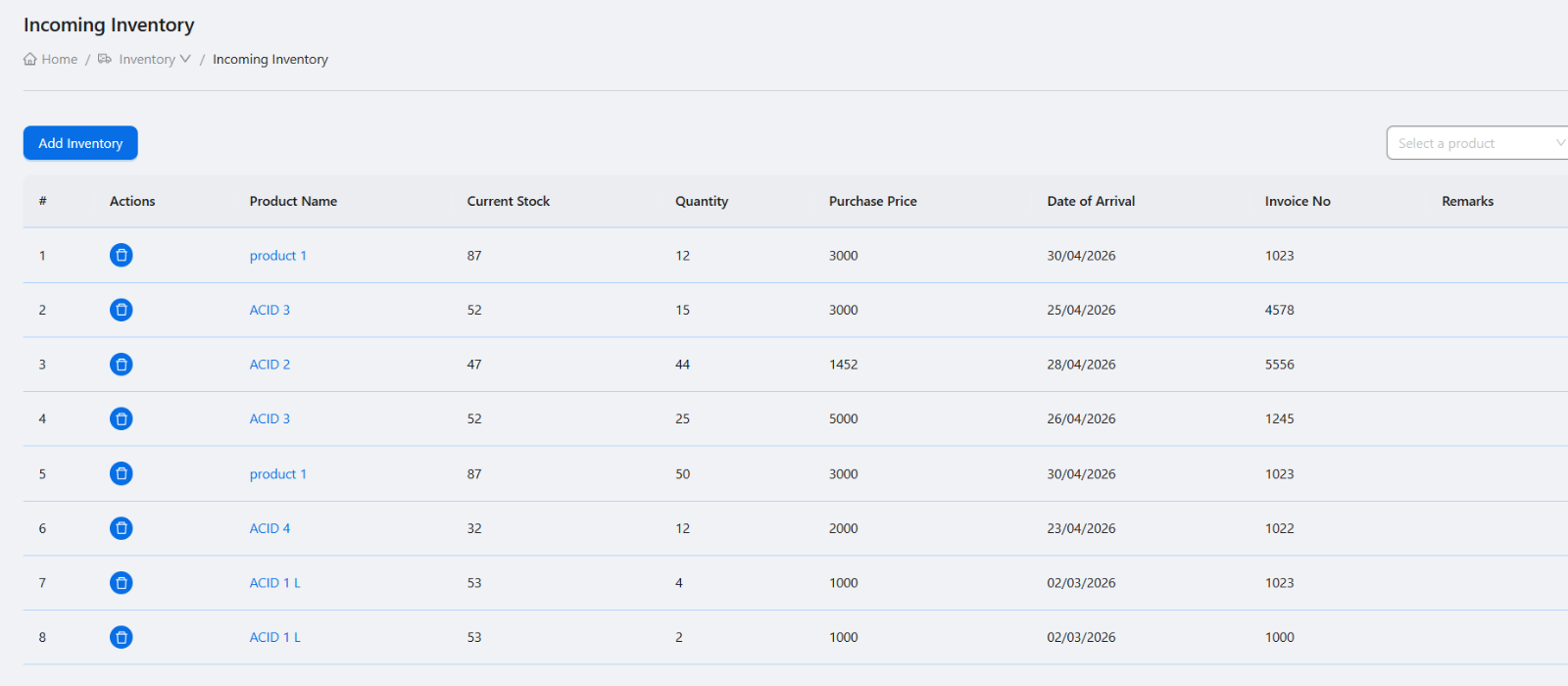
Enter product, quantity, date, supplier or purchase context, and remarks when stock arrives.
- 5
Review stock changes
Use product and incoming inventory lists to confirm stock records are understandable for owner review.
Important fields
Products List
The setup and review area for inventory products before stock entries are made.
Incoming Inventory
The workflow for recording stock additions for products managed through inventory.
Suppliers
Supporting records used for incoming inventory and purchase context.
Product unit generation
A setup detail that should stay inside inventory documentation unless it becomes a large workflow.
Common mistakes
- Creating duplicate products because the Products List was not checked first.
- Recording fuel delivery in inventory instead of the fuel purchase workflow.
- Adding suppliers with incomplete names or contact context.
- Using unclear product units that confuse later stock entries.
Troubleshooting
A product is not available in incoming inventory.
Confirm the product exists, is active, and the user has product and incoming inventory permissions.
Incoming stock looks wrong.
Review product, quantity, date, supplier context, and remarks on the saved entry.
A supplier is duplicated.
Review the supplier list before creating a new supplier and update the existing record where appropriate.
Related documentation
Web dashboard docs
Mobile app equivalents
- Mobile inventory review when available
- Mobile product stock follow-up
Screenshot note
- Uses the existing inventory screenshot. Product tracking can be used as a secondary visual later if needed.
Set up products before stock entries
Product records should be created with clear names, categories, units, pricing or stock fields where used, and enough detail for users to select the correct item later.
Use product detail for verification
The product detail page should be used to review product values before editing, recording incoming stock, or answering stock questions.
Record incoming inventory
Incoming inventory entries should capture product, quantity, date, supplier or purchase context, and remarks so stock changes are understandable later.
Manage suppliers as supporting records
Supplier add and edit actions should stay documented inside inventory because suppliers support stock purchase and incoming inventory entries rather than forming a separate user journey.
Inventory checklist
How Petrodweep supports inventory control
- Petrodweep groups Products List, Incoming Inventory, and supplier workflows under practical inventory documentation.
- Product detail, supplier add/edit, and product unit generation are treated as subtopics instead of extra SEO pages.
- Incoming inventory records help owners review stock additions separately from fuel purchase activity.
Frequently asked questions
Should supplier add and edit be separate documentation pages?
No. They are better explained inside the inventory workflow because users need them while managing products and stock.
Is this the same as fuel purchase?
No. Fuel purchase is used for fuel stock delivery. Inventory is used for products and incoming stock managed through the inventory module.
Why should product detail be reviewed?
Product detail helps users verify the product before stock entries or edits are made.