
How to use this documentation
Use this page as an end-user workflow guide. It explains who should use the page, what setup is needed, what steps to follow, what fields matter, and what to check when something looks wrong.
Who should use it
Before you start
- The user has permission for the relevant report.
- Daily entries, shifts, sales, attendance, coupons, invoices, or purchase records exist for the selected period.
- The user knows the date range and filters needed for review.
Step-by-step workflow
- 1
Open the Reports menu
Choose Reading Monthly, Attendance, Fuel, Profits, Coupon Reports, or Average Sale based on the business question.
- 2
Set date and filters
Confirm date range, shift, user, fuel type, customer, or other available filters before reading totals.
- 3
Review rows and totals
Read the visible rows and totals together so summary numbers can be traced back to report data.
- 4
Reconcile unusual numbers
If a value looks wrong, check the source workflow such as shift readings, DSR, coupons, invoices, attendance, or fuel purchase.
- 5
Use reports for owner decisions
Use the reports for review, follow-up, and owner decision-making after source data is entered correctly.
Important fields
Reading Monthly
Used for monthly reading review and reading-related operating checks.
Attendance
Used to review employee attendance records based on available attendance data.
Fuel
Used to review fuel activity, fuel sales, or fuel-related report data based on enabled report behavior.
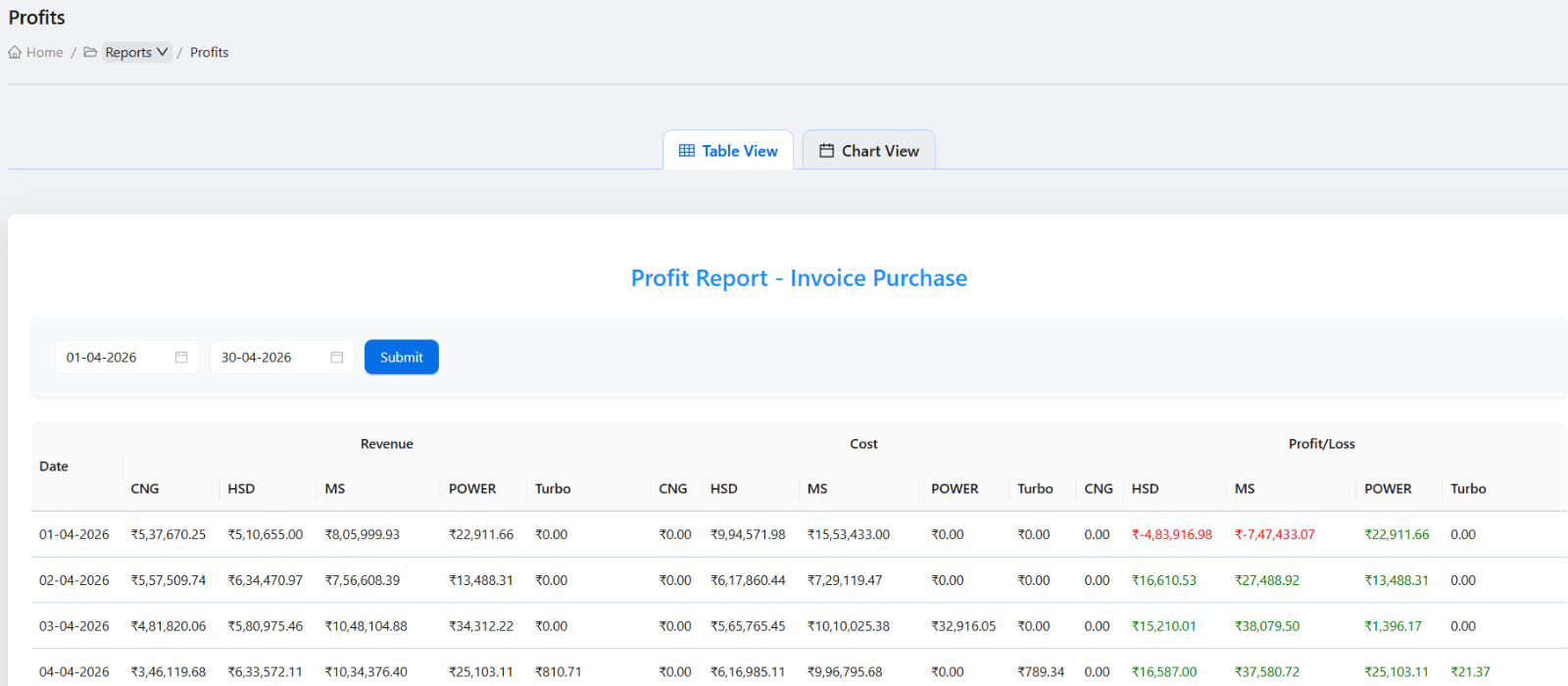
Profits
Used for owner-level profit review after source records are entered.
Coupon Reports
Used for coupon usage, credit, and follow-up review.
Average Sale
Used where enabled to review average sale patterns.
Common mistakes
- Reading report totals without checking date range and filters.
- Trying to correct data inside a report instead of the source workflow.
- Creating separate documentation pages for small report tabs that users do not search for directly.
- Comparing reports without confirming they use the same date range.
Troubleshooting
A report is empty.
Check permissions, selected date range, filters, and whether source records exist for the period.
Report totals do not match expectations.
Compare the report with shift, DSR, invoice, coupon, attendance, or fuel purchase source data.
A report menu is not visible.
Ask an owner or admin to review report permissions for your role.
Related documentation
Web dashboard docs
Mobile app equivalents
- Mobile reports overview when available
- Mobile DSR and shift review
Screenshot note
- Uses the existing reports screenshot from static assets.
- Attendance, operational, and profit screenshots can support this overview without separate thin pages.
Choose the report based on the question
Use Reading Monthly for reading review, Attendance for staff attendance, Fuel for fuel sale or fuel activity review, Profits for owner profit review, Coupon Reports for coupon activity, and Average Sale for average sales analysis where enabled.
Set date and filter context before reading totals
Most reports depend on date range, pump, user, shift, fuel type, or customer filters. Confirm the filter context before comparing totals or exporting data.
Reconcile reports with source workflows
Reports should be checked against source entries such as shift readings, daily sales reports, invoices, coupons, attendance, and fuel purchase records when a number looks unusual.
Use reports for owner review, not first entry
Reports are review tools. Corrections should normally happen in the source module that created the data, not inside the report view itself.
Reports review checklist
How Petrodweep supports report review
- Petrodweep keeps report documentation grouped so owners understand the purpose of each report without reading many thin pages.
- Reading monthly, attendance, fuel, profit, coupon, and average sale reports are explained as one reporting area.
- The docs guide users back to source workflows when a report total needs correction.
Frequently asked questions
Should each report tab have its own documentation page?
No. A grouped reports overview is stronger for users and avoids thin SEO pages unless a report becomes complex enough for its own guide.
Why do report totals look different from expected?
Check date range, filters, permissions, and the source entries that feed the report.
Can reports be used for correction?
Reports are mainly for review. Corrections should be made in the source workflow that created the data.