
How to use this documentation
Use this page as an end-user workflow guide. It explains who should use the page, what setup is needed, what steps to follow, what fields matter, and what to check when something looks wrong.
Who should use it
Before you start
- Shift check-in and shift readings are entered for the day being reviewed.
- Coupons, invoices, expenses, card sales, and product sales are updated where applicable.
- The reviewer has permission to view daily operations.
Step-by-step workflow
- 1
Select the operating date
Open the report for the date you want to review and confirm the selected date before reading totals.
- 2
Check all shift activity
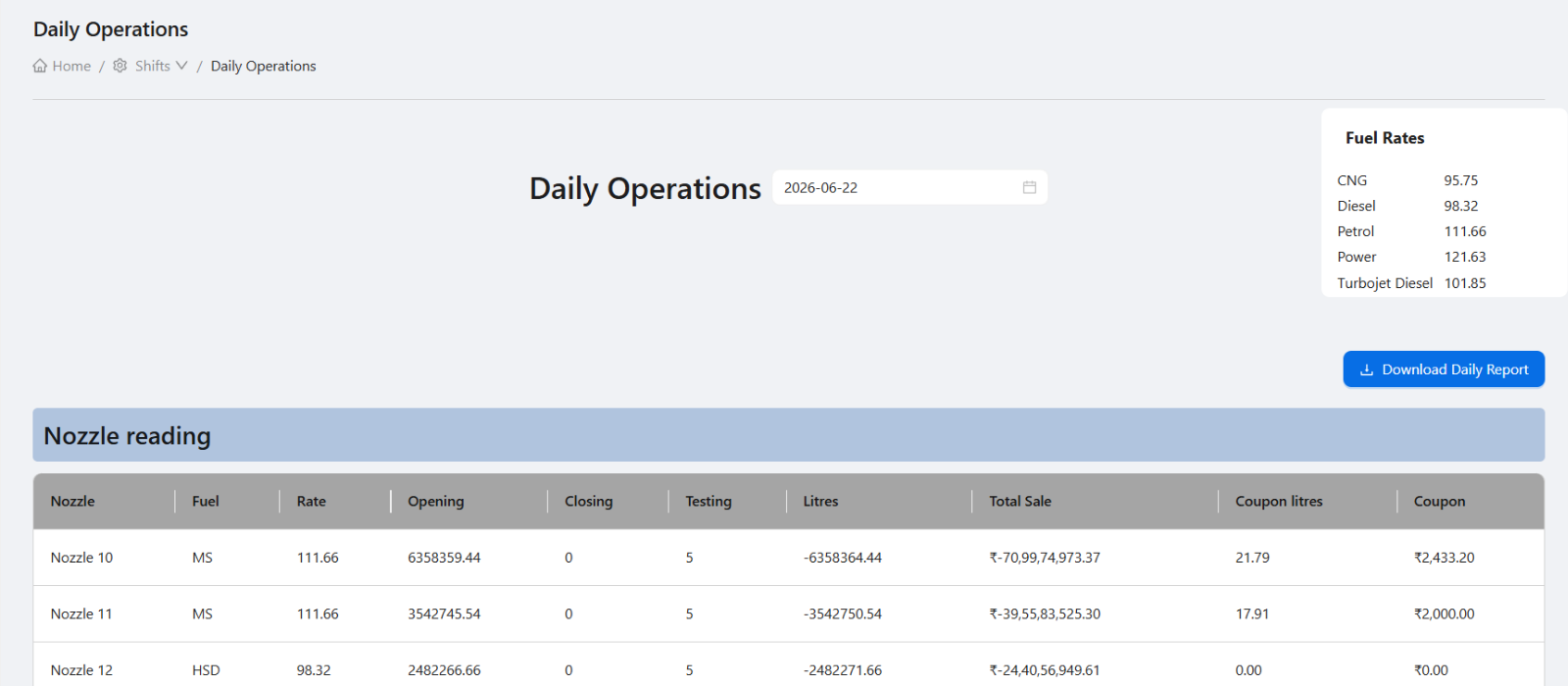
Review nozzles, employees, card sales, coupons, invoices, expenses, product sales, and fuel rates together.
- 3
Compare totals with expected settlement
Use total sale and cash in hand to identify whether any shift entry or collection needs follow-up.
- 4
Open related modules when needed
If a coupon, invoice, card sale, expense, or product sale looks wrong, open the related module instead of editing blindly.
- 5
Download or print for records
Use the report output when the owner, accountant, or manager needs an offline copy.
Important fields
Date
Daily operations is date-wise. Wrong date selection is the most common reason data appears missing.
Fuel rates
Fuel rates should match the operating day and support sale calculation review.
Expenses
Expenses reduce cash available for handover and should be checked with settlement totals.
Invoices and coupons
Customer-linked activity should be reviewed separately from immediate cash collection.
Common mistakes
- Using daily operations before all shift rows are updated.
- Reviewing only total sale and ignoring expenses, coupons, and card sales.
- Printing the report before resolving obvious mismatches.
- Confusing daily operations with the tank-wise DSR.
Troubleshooting
Daily totals do not match shift totals.
Check whether every shift for that date has been entered and whether the date filter is correct.
Coupon or invoice values are unexpected.
Open the coupon or invoice workflow and review status, customer, amount, and linked shift details.
Cash in hand is lower than expected.
Review expenses, card machine totals, credit coupons, and product sale entries before changing cash values.
Related documentation
Web dashboard docs
Mobile app equivalents
- Mobile daily dashboard
- Mobile current shift review
Screenshot note
- Uses the existing daily operations image from static assets.
Use it after shift data is entered
Daily operations is most useful after shift check-in and current shift readings are updated. It consolidates multiple shift sections into a date-level operational review.
Review every operational section
A good daily review should not stop at total sales. Managers should check nozzles, employees, coupons, card sales, invoices, expenses, product sales, and cash in hand together.
- Nozzle readings and fuel sales.
- Employee shift activity.
- Coupons used during the day.
- Card sales and card machine totals.
- Expenses and product sales.
- Invoice activity and total sale.
Use the report for owner review
Owners can use daily operations as a quick review page before drilling into DSR, profit, coupon, or customer reports. It gives enough context to identify which area needs attention.
Download or print for records
The daily operations report can be used as a record of the day's operating activity. Teams can print or download it where required for internal review or offline filing.
Daily operations review checklist
How Petrodweep helps with daily operations
- Petrodweep combines multiple shift sections into a date-wise daily operations view.
- The report helps owners identify mismatches without opening every transaction screen first.
- Daily operations connects naturally with DSR, customer, invoice, coupon, and profit review.
Frequently asked questions
When should daily operations be reviewed?
It should be reviewed after shift data is entered and before final owner-level daily review or settlement.
Is daily operations the same as DSR?
No. Daily operations is an operational summary. DSR focuses more on tank stock, receipts, meter sales, testing, density, and variation.
Who should use this report?
Owners, admins, managers, and auditors can use it for daily review depending on their permissions.