
How to use this documentation
Use this page as an end-user workflow guide. It explains who should use the page, what setup is needed, what steps to follow, what fields matter, and what to check when something looks wrong.
Who should use it
Before you start
- Shift check-in has been recorded for the selected date and shift.
- Nozzle readings, card sales, coupons, expenses, and product sales are entered as applicable.
- The reviewer has permission to view current shift details.
Step-by-step workflow
- 1
Select the date and shift
Choose the same date and shift used during check-in so the report loads matching employee and nozzle data.
- 2
Review employee and nozzle readings
Check opening, closing, testing litres, litres sold, rates, and calculated amount for each nozzle and employee.
- 3
Check non-cash sections
Review card machine sales, coupons, invoices, expenses, and product sales before relying on cash totals.
- 4
Compare settlement values
Use total sale and cash in hand to compare expected settlement against actual handover.
- 5
Resolve mismatches before owner review
Fix missing entries or explain differences before using the report for daily operations or owner review.
Important fields
Opening and closing readings
These readings drive litres sold and sale amount calculations.
Testing litres
Testing litres should be reviewed because they reduce net sale quantity.
Coupons and invoices
These sections explain credit or customer-linked fuel activity that may not be collected as cash immediately.
Cash in hand
Cash in hand should be checked after card, coupon, expense, and product sections are reviewed.
Common mistakes
- Reviewing total sale without checking the supporting nozzle rows.
- Ignoring testing litres or expenses when cash does not match.
- Comparing shift totals against the wrong date or shift.
- Treating coupons as cash collections during settlement.
Troubleshooting
The report is empty.
Confirm check-in and shift entries exist for the selected date and shift.
A nozzle reading is missing.
Check the original nozzle assignment and whether the reading was entered for that shift.
Cash in hand does not match expected settlement.
Review coupons, card sales, expenses, invoices, product sales, and testing litres before changing readings.
Related documentation
Web dashboard docs
Mobile app equivalents
- Mobile current shift card view
- Mobile coupon and QR verification
Screenshot note
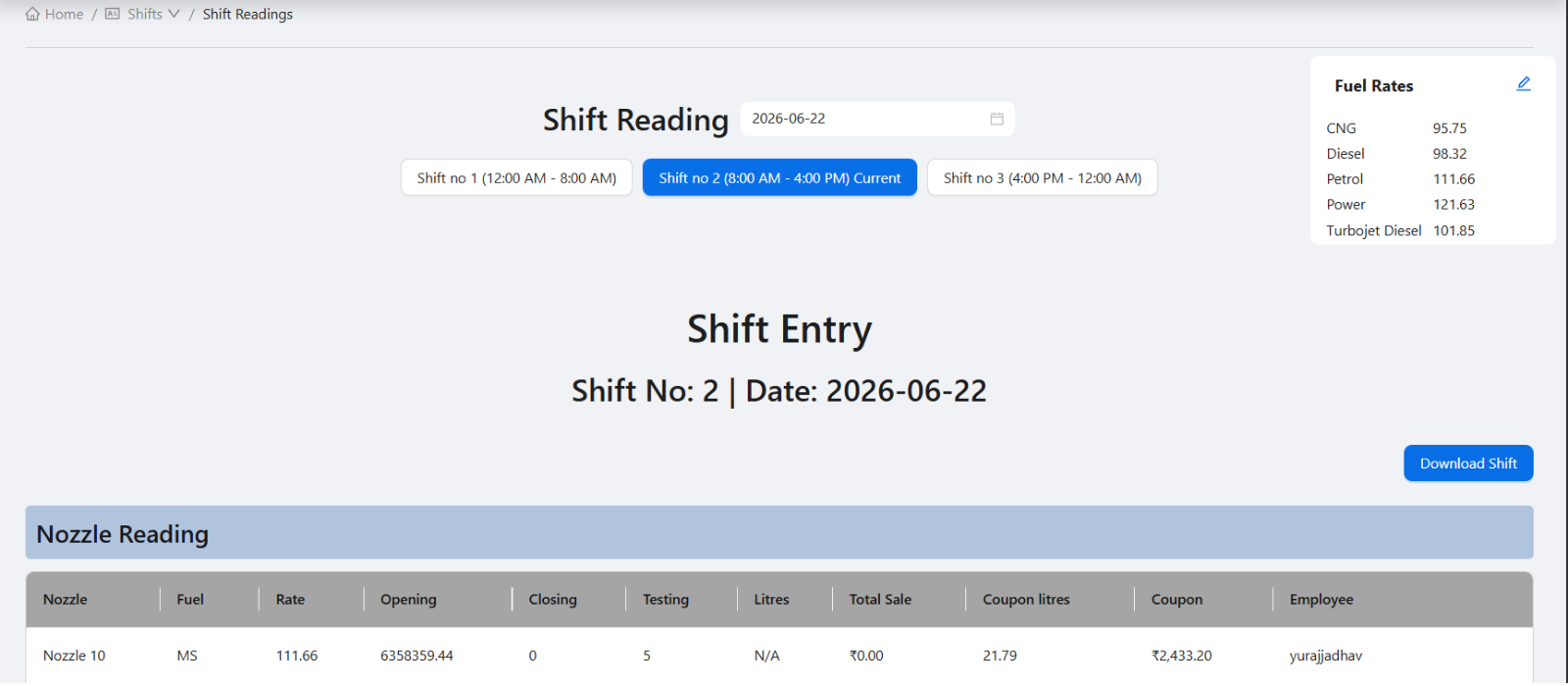
- Uses the existing shift readings screenshot already used by the resource page.
Choose the shift to review
Start by selecting the date and shift number. The report should be reviewed for the same date and shift used in check-in so readings, employee records, and settlement values line up.
Review nozzle and employee data
Nozzle readings are the core of fuel sales review. Managers should check opening reading, closing reading, testing litres, litres sold, rate, and calculated amount for each nozzle and assigned employee.
- Opening and closing readings.
- Testing litres.
- Litres sold and sale amount.
- Employee responsibility.
- Fuel rate used for the shift.
Check supporting shift sections
Fuel sales are only one part of the shift. Coupons, card sales, expenses, product sales, and invoices can affect settlement and cash handover. The shift report helps review these sections together.
Use totals for settlement review
Total sale and total cash in hand help managers compare expected settlement with actual cash and card records. Any mismatch should be resolved before daily operations or owner review.
Shift readings review checklist
How Petrodweep supports shift reading review
- Petrodweep brings key shift sections into one current shift report for easier review.
- Managers can use the report to validate nozzle readings, coupons, card sales, expenses, products, and cash.
- The same shift data supports daily operations and reporting workflows.
Frequently asked questions
What is the difference between shift check-in and shift readings?
Shift check-in records who is responsible for the shift and assigned resources. Shift readings review the actual activity and settlement data for that shift.
Should coupons be reviewed in the shift report?
Yes. Coupons affect shift-level visibility and should be reviewed with nozzle, card, and cash data.
Can the shift report be printed or downloaded?
The web dashboard includes shift report review and download or print-oriented workflows for operational records.