
How to use this documentation
Use this page as an end-user workflow guide. It explains who should use the page, what setup is needed, what steps to follow, what fields matter, and what to check when something looks wrong.
Who should use it
Before you start
- Fuel types, tanks, nozzles, and relevant fuel purchase entries are set up.
- Shift readings and testing quantities are available for the day being reviewed.
- The user has permission to view and edit DSR rows where corrections are needed.
Step-by-step workflow
- 1
Select tank, year, and month
Open the DSR grid for the correct tank and period before reviewing or editing rows.
- 2
Review opening and receipt values
Confirm opening stock and fuel receipts before checking meter sales or variation.
- 3
Check meter sales and testing
Review sales by meter and pump test values because they affect net sales by meter.
- 4
Use calculation support carefully
Use calculated values where available, then verify the row before saving corrections.
- 5
Export when review is complete
Export the DSR for owner, accountant, or internal review after values are checked.
Important fields
Opening stock
Opening stock is the starting quantity for the selected tank and date.
Receipt
Receipt represents fuel added through purchase or tanker receipt for the period.
Pump test
Pump testing litres should be deducted from meter sales when reviewing net sales.
Variation
Daily and cumulative variation help identify stock mismatches or data entry issues.
Common mistakes
- Editing a row while the wrong tank or month is selected.
- Ignoring fuel receipt values before reviewing variation.
- Saving calculated values without checking source readings.
- Treating variation as an accounting value without investigating operational causes.
Troubleshooting
The expected row is not visible.
Check the selected tank, month, and year first. Then confirm DSR data exists for that date.
Variation looks unusually high.
Review opening stock, receipt, meter sales, testing litres, dip values, and density records before editing.
The export does not match what you expected.
Reopen the selected tank and period, confirm filters, then export again after corrections are saved.
Related documentation
Web dashboard docs
Mobile app equivalents
- Mobile reports overview
- Mobile fuel and shift summaries
Screenshot note
- Uses the existing daily sales image from static assets.
Select tank, year, and month
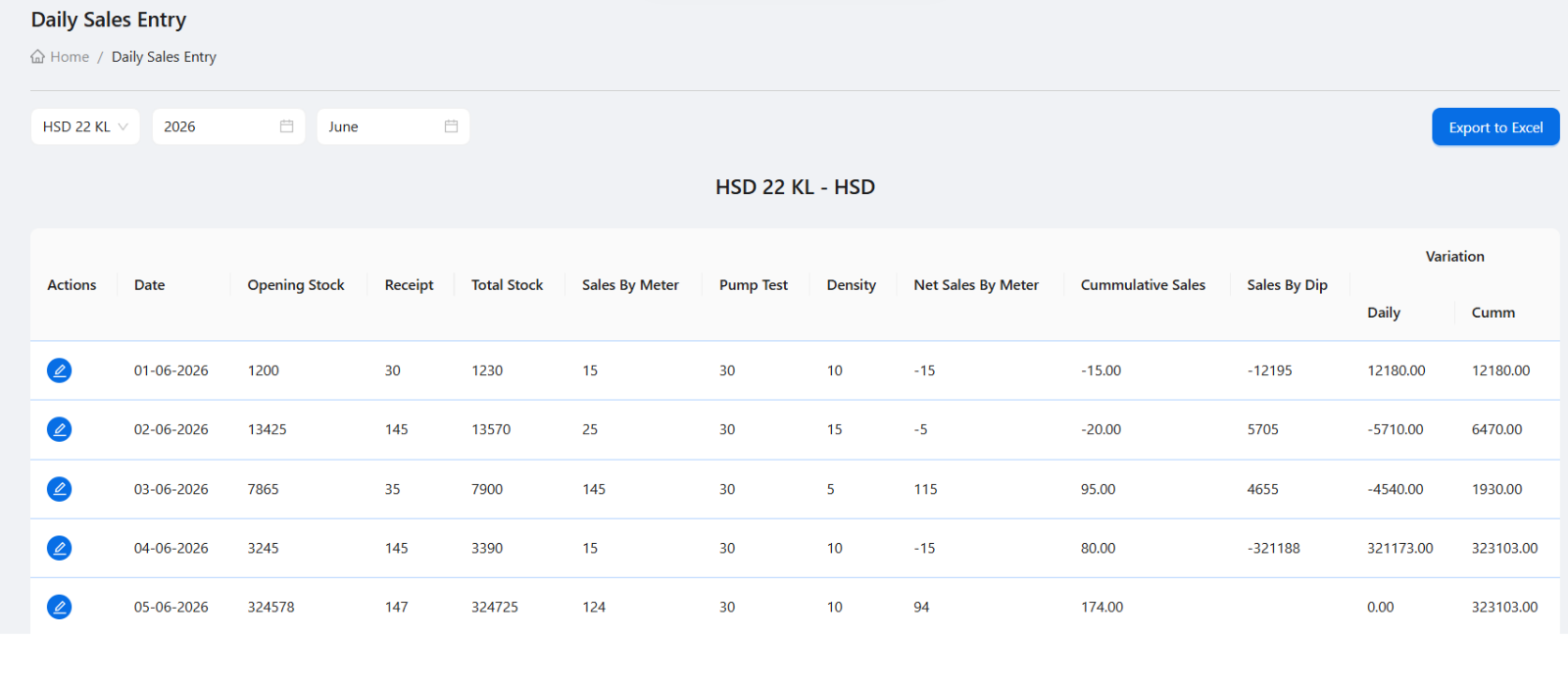
The DSR grid depends on the selected tank, year, and month. This helps managers review a complete month of date-wise rows for the selected tank instead of entering one isolated day at a time.
Understand the main DSR fields
Each row should be reviewed as a stock and sales control record. Opening stock and receipt create total stock. Sales by meter and pump testing help calculate net sales. Rate, density, and dip-based values support further review.
- Opening stock and receipt.
- Total stock after receipt.
- Sales by meter and pump test.
- Net sales by meter.
- Rate and density.
- Sales by dip, daily variation, and cumulative variation.
Use calculate before saving corrections
When editing a row, managers can use calculated data to reduce manual entry. Corrections should be saved only after checking the source values and confirming the selected tank and date.
Export for review
DSR export is useful when owners or accountants want a spreadsheet-style copy for review, offline filing, or cross-checking with other records.
DSR entry checklist
How Petrodweep supports DSR
- Petrodweep provides tank-wise DSR grids with monthly selection and row-level editing.
- Calculated data helps reduce manual work while still allowing authorized corrections.
- DSR connects with wider stock, shift, and report review workflows.
Frequently asked questions
What does DSR mean in Petrodweep?
DSR means Daily Sales Report. It is used to review daily stock, receipt, meter sales, testing, rate, density, and variation for a selected tank.
Can a DSR row be corrected?
Yes. Authorized users can edit a row, use calculate actions where available, and save corrected values.
Why track variation in DSR?
Variation helps owners identify stock mismatches, data entry errors, measurement differences, or process issues.