
How to use this documentation
Use this page as an end-user workflow guide. It explains who should use the page, what setup is needed, what steps to follow, what fields matter, and what to check when something looks wrong.
Who should use it
Before you start
- Customer and vehicle records exist for credit customer coupon workflows.
- Fuel types are set up.
- Users have permission to create, view, accept, deny, fulfil, cancel, print, or invoice coupons as required.
Step-by-step workflow
- 1
Create the coupon with customer context
Select the customer, vehicle, fuel type, amount or litres, validity, phone, email, and comments.
- 2
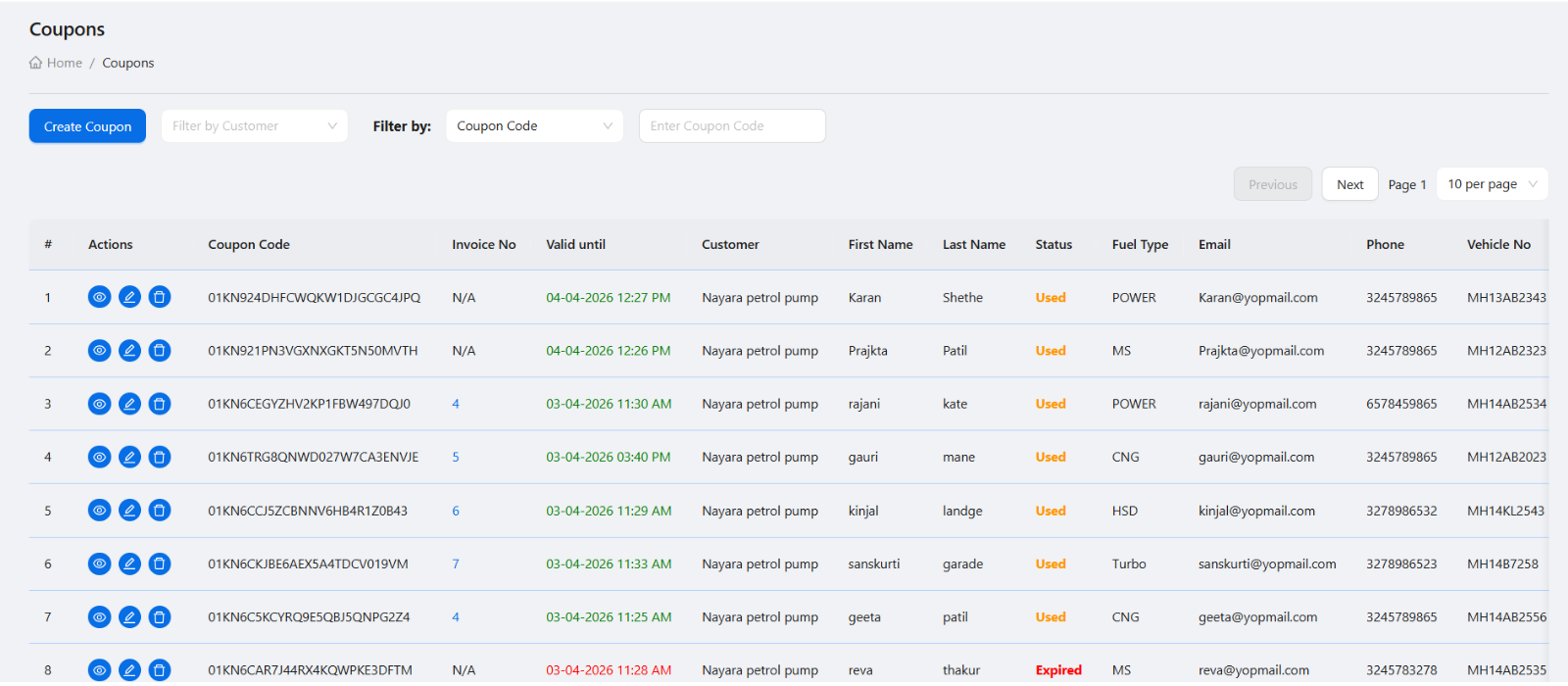
Find coupons using filters
Use customer, coupon code, status, date range, and page size filters instead of scrolling through long lists.
- 3
Open the coupon detail page
Review customer, vehicle, fuel, amount or litres, QR or print view, status, and validity before changing status.
- 4
Use status actions carefully
Accept, deny, fulfil, or cancel only after checking customer, vehicle, validity, fuel type, and business rules.
- 5
Use coupons during invoice generation
Pending or fulfilled coupon records should be reviewed when preparing customer invoices.
Important fields
Coupon code
The identifier used for search, QR verification, and customer communication.
Validity
The date range or expiry context that controls when the coupon should be accepted.
Amount or litres
The coupon can represent a money value or fuel quantity depending on the pump workflow.
Status
Status tells staff whether the coupon is pending, accepted, denied, fulfilled, cancelled, or invoiced.
Common mistakes
- Creating a coupon under the wrong customer or vehicle.
- Accepting an expired or invalid coupon without checking validity.
- Cancelling a coupon that should only be denied or left pending.
- Generating invoices without reviewing coupon status and linked customer details.
Troubleshooting
A coupon cannot be found.
Search by coupon code and customer, then clear date or status filters that may be hiding it.
A coupon action is not available.
Check the coupon status and your role permissions for that action.
A coupon does not appear during invoice generation.
Confirm the coupon customer, status, billing period, and whether the coupon has already been invoiced.
Related documentation
Web dashboard docs
Mobile app equivalents
- Mobile coupon list and detail
- Mobile QR scanner for coupon verification
Screenshot note
- Uses existing coupon list and coupon management static screenshots.
Create coupons with the right customer context
A coupon should be created with the correct customer, vehicle number, fuel type, amount or litres, validity, phone, email, and comments. This makes the coupon easier to verify at the pump and easier to bill later.
Use filters to find coupons quickly
The coupon list supports practical lookup fields such as customer, coupon code, start date, end date, page size, and status. Managers should use filters instead of scrolling through long lists.
Verify with QR and print view
The coupon detail page shows important information for verification and can include QR and print-oriented views. This helps staff check customer, fuel, amount or litres, and status before accepting fuel usage.
- Coupon code and status.
- Customer and vehicle details.
- Fuel type, litres, or amount.
- Validity and usage details.
- QR or print view for verification.
Accept, deny, fulfil, or cancel carefully
Coupon status changes should be handled with care because they affect customer usage and invoice generation. Staff should confirm check-in requirements, nozzle type, and customer details before accepting a coupon.
Coupon workflow checklist
How Petrodweep supports coupon workflows
- Petrodweep connects coupons with customers, vehicles, shifts, invoices, and reports.
- Coupon filters and detail pages help staff find and verify customer fuel records quickly.
- Coupon data can support invoice generation and customer account review.
Frequently asked questions
Can coupons be created by amount or litres?
Yes. Petrodweep supports coupon workflows based on amount or litres depending on how the customer fuel issue is handled.
Why is coupon status important?
Coupon status shows whether the coupon is pending, used, cancelled, denied, or otherwise handled. This affects fuel issue and billing.
How do coupons connect to invoices?
Coupon records can be reviewed during invoice generation so customer invoices are based on actual coupon usage.