
How to use this documentation
Use this page as an end-user workflow guide. It explains who should use the page, what setup is needed, what steps to follow, what fields matter, and what to check when something looks wrong.
Who should use it
Before you start
- Customer access and customer-management permissions are assigned.
- Customer contact, GST, PAN, address, credit, and billing-cycle details are available.
- Vehicle records are available if coupons or invoice workflows will use vehicle context.
- Agreement requirements are known if the pump uses formal customer terms.
Step-by-step workflow
- 1
Create or open the customer record
Use the customer list to add a new customer or open an existing customer for review.
- 2
Complete profile and contact fields
Enter name, phone, email, address, GST, PAN, customer type, and required document details.
- 3
Set credit and billing controls
Review deposit, credit limit, current limit, invoice balance, day limit, billing cycle, and service charge.
- 4
Link vehicles and users where needed
Add vehicle records and customer-linked users if the customer will use coupons or account access.
- 5
Review agreements where required
If the pump requires agreement acceptance before credit usage, review agreement records before coupon or invoice work.
- 6
Review before coupon or invoice work
Confirm customer details before creating coupons or generating invoices from customer activity.
Important fields
Credit limit
The approved amount of credit the customer can use based on pump policy.
Current credit limit
The currently available credit after usage, invoices, and payments are considered.
Billing cycle
Defines how frequently the customer should be invoiced or reviewed.
Documents
PAN, Aadhaar, GST, or similar records support verification and billing clarity.
Vehicle records
Vehicle numbers connect customer fuel usage with coupons, bills, and invoice review.
Common mistakes
- Creating coupons before customer credit and vehicle details are ready.
- Skipping agreement review when the customer requires formal terms.
- Leaving GST or PAN details incomplete for customers who need tax invoices.
- Confusing invoice balance with available credit limit.
- Using one customer record for multiple unrelated accounts.
Troubleshooting
A customer is not available during coupon or invoice creation.
Check whether the customer record is active and whether required customer fields are complete.
Credit values look wrong.
Review invoices, payments, deposit, credit limit, and current limit before editing the customer record.
A vehicle cannot be selected.
Confirm the vehicle is linked to the correct customer and is available for the relevant workflow.
Related documentation
Web dashboard docs
Mobile app equivalents
- Mobile customer list and details
- Mobile coupon workflow
Screenshot note
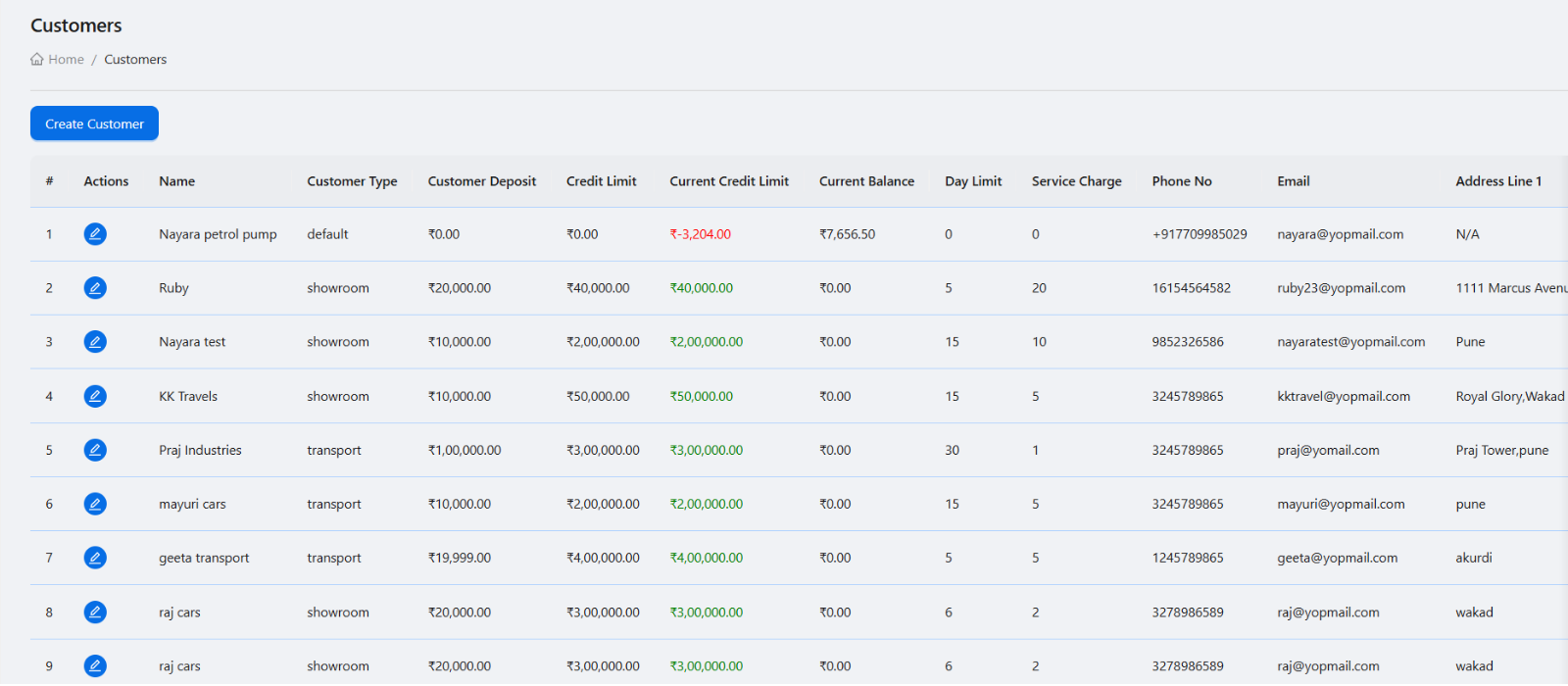
- Uses the existing customer management screenshot from static assets.
Maintain complete customer profiles
Customer records should include business and contact information such as company name, phone, email, address, GST, PAN, customer type, and supporting documents. Better profiles reduce disputes during billing and follow-up.
Use credit fields for control
Credit limit, current credit limit, deposit, invoice balance, day limit, billing cycle, and service charge help owners manage how much fuel a customer can use and how billing should be handled.
- Deposit and credit limit.
- Current available limit.
- Invoice balance.
- Day limit and billing cycle.
- Service charge where applicable.
Connect customers with vehicles and coupons
Customer records become more valuable when connected to vehicles and coupons. This lets the pump know which vehicle used fuel, which coupon was issued, and how the usage should appear during invoice generation.
Use the customer view for quick review
The customer detail view helps users review the profile and move into related actions such as creating customer-linked users or checking account information.
Customer setup checklist
How Petrodweep supports customer management
- Petrodweep stores customer operational, billing, and credit details in one workflow.
- Customer records connect with vehicles, coupons, invoice generation, and payment review.
- Owners can use customer data to improve billing accuracy and credit follow-up.
Frequently asked questions
Why add credit limits for petrol pump customers?
Credit limits help owners control exposure and reduce the risk of uncontrolled fuel issuance.
Should vehicle records be linked to customers?
Yes. Vehicle linkage improves coupon verification, usage tracking, and invoice clarity.
Can customer documents be stored?
Petrodweep supports customer document fields such as PAN card and Aadhaar card where the pump needs them for records.