
How to use this documentation
Use this page as an end-user workflow guide. It explains who should use the page, what setup is needed, what steps to follow, what fields matter, and what to check when something looks wrong.
Who should use it
Before you start
- Shift check-in entries exist for the selected date and shift.
- The user has permission to view shift readings or all-shift data.
- Fuel rates and source entries are available for the selected period.
Step-by-step workflow
- 1
Select date and shift
Choose the shift date and shift number. Select All Shifts only when the app exposes it for your permission level.
- 2
Review nozzle readings
Check opening, closing, testing, litres, total sale, coupon litres, coupon amount, fuel, rate, and employee context.
- 3
Review employees and payments
Use employee, coupon, and card machine sections to compare sales, coupon use, card sales, and cash in hand.
- 4
Review operating adjustments
Check expenses and product sales because they affect final cash and total operating review.
- 5
Confirm totals
Use Total Sale and Total Cash in Hand only after source sections have been checked.
Important fields
All Shifts
Daily operation view across shifts for users with all-shift permission.
Nozzle Reading
Fuel reading table used to calculate litres, sale amount, coupons, and cash output.
Employee
Shows employee sale, nozzles, card machines, coupons, and cash in hand.
Products and expenses
Supporting entries that change total sale and cash in hand.
Common mistakes
- Comparing totals while the wrong shift or date is selected.
- Ignoring warning messages about missing or unavailable shift data.
- Treating chart or total values as final before checking nozzles and employee rows.
- Forgetting to refresh after adding expenses, products, or employee check-ins.
Troubleshooting
Current Shift is empty.
Check date, shift number, permissions, and whether shift check-in entries exist.
All Shifts is missing.
The user likely does not have all-shift day permission.
Totals do not match expected cash.
Review nozzles, card machines, coupons, expenses, products, invoices, and selected shift.
Related documentation
Web dashboard docs
Mobile app equivalents
- Mobile Shift Check-In
- Mobile Daily Sales Report
- Mobile Reports
Screenshot note
- Uses mobileApp3 from the existing static mobile screenshot set.
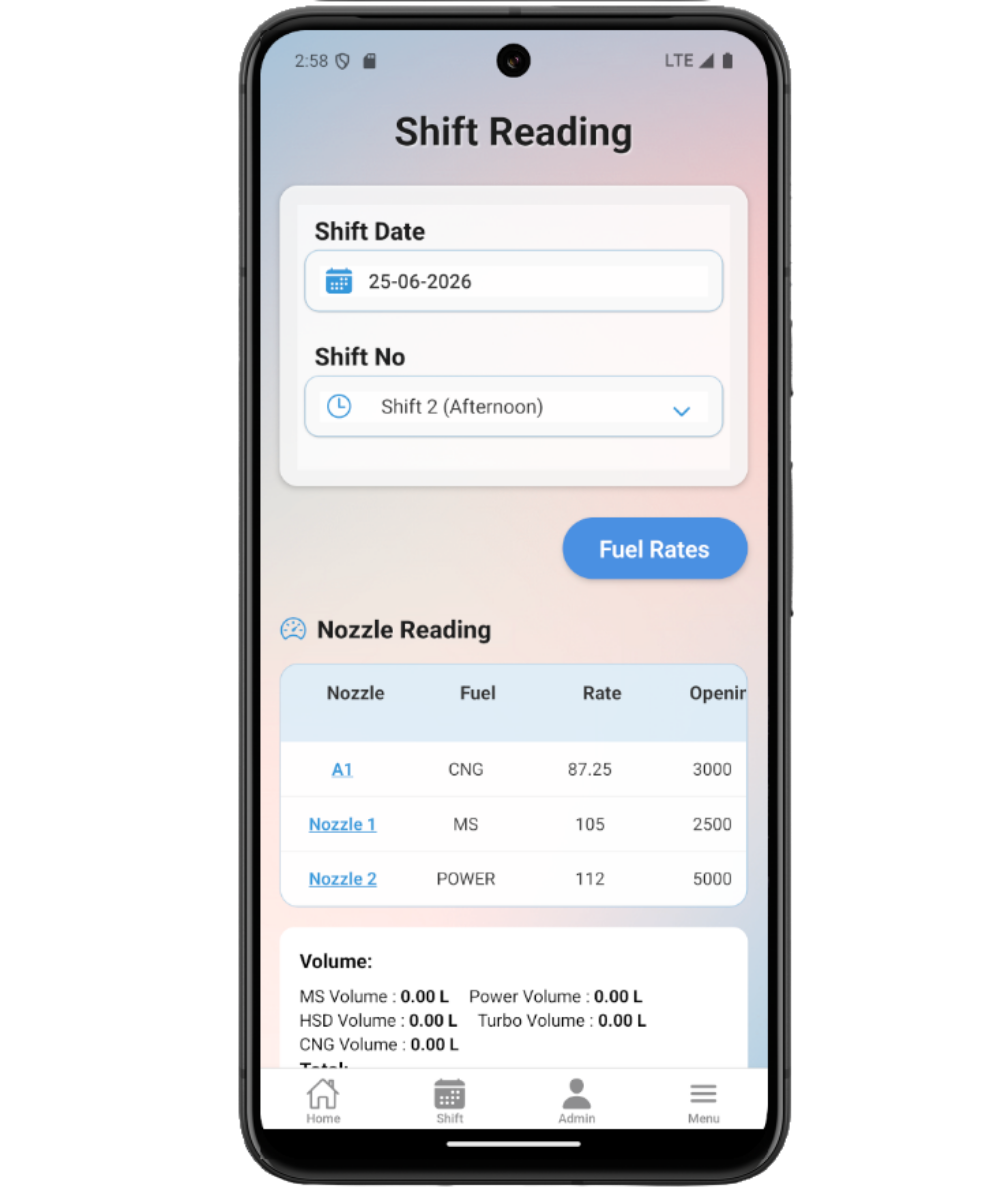
Choose date and shift
Use the date picker and shift selector to load the correct shift. Users with all-shift permission can choose All Shifts to review daily operation totals across shifts.
Review nozzle readings
Nozzle rows show fuel, rate, opening, closing, testing, litres, total sale, coupon litres, coupon amount, and employee context where applicable.
Review employee and payment sections
Employee rows summarize total sale, nozzles, card machines, coupons, and cash in hand. Card sales and coupons should be checked before accepting totals.
Review expenses, products, and invoices
Current Shift includes expense and product sale sections. When All Shifts is selected, invoice data can also appear for daily review.
Use totals for final review
Total Sale and Total Cash in Hand are calculated outputs. If they look wrong, review the underlying nozzles, products, expenses, coupons, card sales, and invoices first.
Current shift review checklist
How Petrodweep supports mobile shift review
- Petrodweep groups every current shift section into one mobile review page so users can reconcile the day without opening separate docs for every table.
- All-shift review helps owners and managers see daily operations across the selected date.
- Fuel rates can be checked from the same workflow when readings need rate context.
Frequently asked questions
Why can I see All Shifts?
All Shifts appears only when your role has permission to review all shifts for the day.
Why do totals look wrong?
Check nozzles, products, expenses, card sales, coupons, invoices, date, shift, and filters before treating the total as incorrect.
Should every current shift table have its own doc page?
No. Users understand Current Shift better when the sections are explained together.