
How to use this documentation
Use this page as an end-user workflow guide. It explains who should use the page, what setup is needed, what steps to follow, what fields matter, and what to check when something looks wrong.
Who should use it
Before you start
- The user has permission to view or manage bills and vouchers.
- Customer and vehicle context is available where the bill or voucher needs it.
- The user understands whether the record should be a bill, voucher, or generated invoice.
Step-by-step workflow
- 1
Choose bill, voucher, or invoice
Decide whether the work belongs in bills, vouchers, or Send Invoice before creating a record.
- 2
Create the bill or voucher
Enter customer, vehicle, payment, bill item, voucher type, amount, and remarks based on the selected workflow.
- 3
Review the list and detail page
Use the bill or voucher list to find records, then open the detail page for review before print or approval.
- 4
Approve only after checking the record
Use approval actions only after confirming customer, vehicle, amount, item details, status, and supporting context.
- 5
Print or file after approval review
Print or file the record after detail values and approval context are correct.
Important fields
Bill
A customer or vehicle-related bill record with item and payment context.
Voucher
An approval-oriented record with voucher type, amount, and customer context.
Status
Shows whether the record is pending, approved, or otherwise handled.
Print view
The review output used after detail values are checked.
Common mistakes
- Creating a bill when the customer should be invoiced from pending coupons.
- Approving a bill or voucher before checking customer, vehicle, amount, and remarks.
- Treating bill approval or voucher approval as a separate workflow from detail review.
- Printing before confirming the record is correct.
Troubleshooting
A bill has the wrong vehicle number.
Review the bill detail and customer vehicle context before approving or printing.
A voucher amount is disputed.
Check voucher type, customer context, amount, remarks, and approval history.
A user cannot approve a bill or voucher.
Check role permissions and record status before changing the record.
Related documentation
Web dashboard docs
Mobile app equivalents
- Mobile bill and voucher review when available
- Mobile invoice detail for customer billing follow-up
Screenshot note
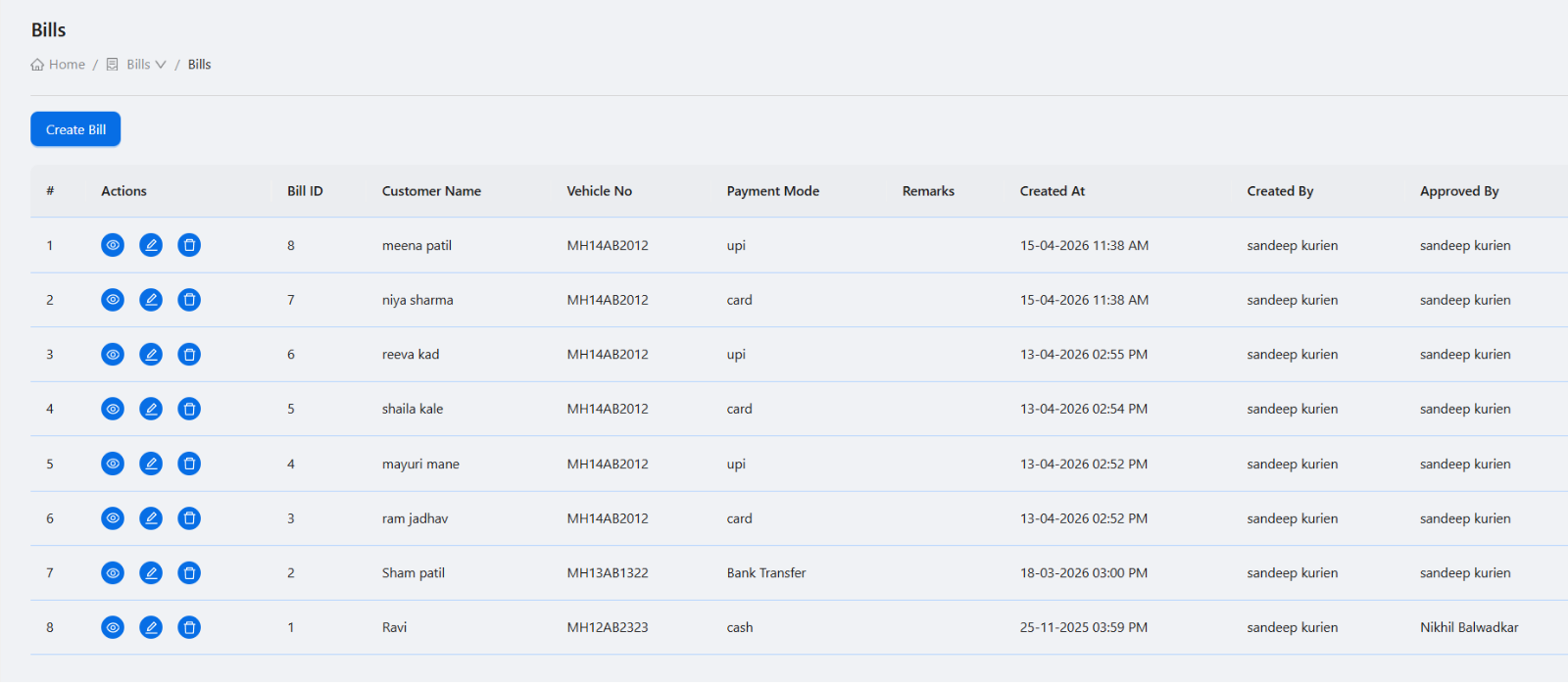
- Uses the existing bills screenshot. Voucher and bill detail screenshots can be added later if needed.
Use bills for customer or vehicle bill records
Bills can capture customer, vehicle number, payment mode, remarks, and bill item details. They are useful when the pump needs a bill record outside the coupon-to-invoice generation flow.
Review bill detail before print or approval
The bill detail view should be checked for bill number, customer, vehicle number, bill items, totals, status, approval context, and print layout before sharing or filing.
Use vouchers for approval-based entries
Voucher records help track voucher type, customer context, amount, and approval workflow. They should be created with enough detail for later manager or owner review.
Keep bills, vouchers, and invoices distinct
Bills, vouchers, and invoices serve different purposes. Use Send Invoice for generated customer invoices from pending coupon or billing rows, and use bills or vouchers for their own supporting workflows.
Bills and vouchers checklist
How Petrodweep supports bills and vouchers
- Petrodweep separates bills, vouchers, and generated invoices so each billing workflow stays easier to review.
- Bill detail and voucher detail pages help users verify records before approval, print, or correction.
- Customer and vehicle context keeps supporting billing records connected to account review.
Frequently asked questions
Are bills the same as invoices?
No. In Petrodweep, Send Invoice is used for customer invoice generation from pending billing or coupon data. Bills are separate bill records with their own detail and print workflow.
When should vouchers be used?
Use vouchers when the pump needs an approval-oriented voucher record with customer context, voucher type, amount, and detail review.
Should bill approval be a separate documentation page?
No. Bill approval is part of the bills workflow and should be understood with bill creation, detail review, and print behavior.