
How to use this documentation
Use this page as an end-user workflow guide. It explains who should use the page, what setup is needed, what steps to follow, what fields matter, and what to check when something looks wrong.
Who should use it
Before you start
- The Petrodweep account is ready for the pump.
- An owner or trusted admin can access the web dashboard.
- Mobile users have install access and login details.
- Basic pump data such as fuels, tanks, nozzles, shifts, and users is known.
Step-by-step workflow
- 1
Complete the core web setup
Use the web dashboard for master data, fuel setup, tanks, nozzles, shift timings, card machines, tankers, users, roles, and first reporting checks.
- 2
Create users and roles before mobile rollout
Assign role permissions before asking staff to use the mobile app so menu visibility matches responsibility.
- 3
Verify mobile login and base data
Ask each key user to log in, confirm approval, check base data load, and verify that expected mobile menus are visible.
- 4
Run a test daily workflow
Test shift check-in, current shift review, DSR or sales entry, customer or coupon work, fuel purchase or density if relevant, and invoice review.
- 5
Review first-week output
At the end of the first week, check dashboard, reports, invoices, stock, density, users, roles, and task follow-up.
Important fields
Best on web
Master setup, user and role design, reporting, and first-week review.
Best on mobile
Login verification, menu checks, shift activity, quick operational tests, and staff adoption.
Downstream records
Users, roles, fuels, tanks, nozzles, shifts, customers, invoices, purchases, density checks, reports, and tasks.
Owner review
Dashboard, reports, daily operations, billing, stock, density, and unresolved tasks.
Common mistakes
- Starting live entries before fuel, tank, nozzle, shift, and role setup is checked.
- Giving every staff member owner-level access during setup.
- Skipping mobile login checks until the first live shift.
- Treating first-week setup as only a web task and ignoring field users.
Troubleshooting
A mobile user cannot see the expected menu.
Check the user's active status, assigned role, and permission groups in the web or mobile user-role documentation.
Reports look empty after setup.
Confirm real or test transactions have been entered for the selected date range.
First live workflow feels blocked.
Return to the setup checklist and verify master data, users, roles, and mobile base data load.
Related documentation
Web dashboard docs
Mobile app equivalents
- Mobile App Getting Started
- Mobile Settings
- Mobile Role-based Access
Screenshot note
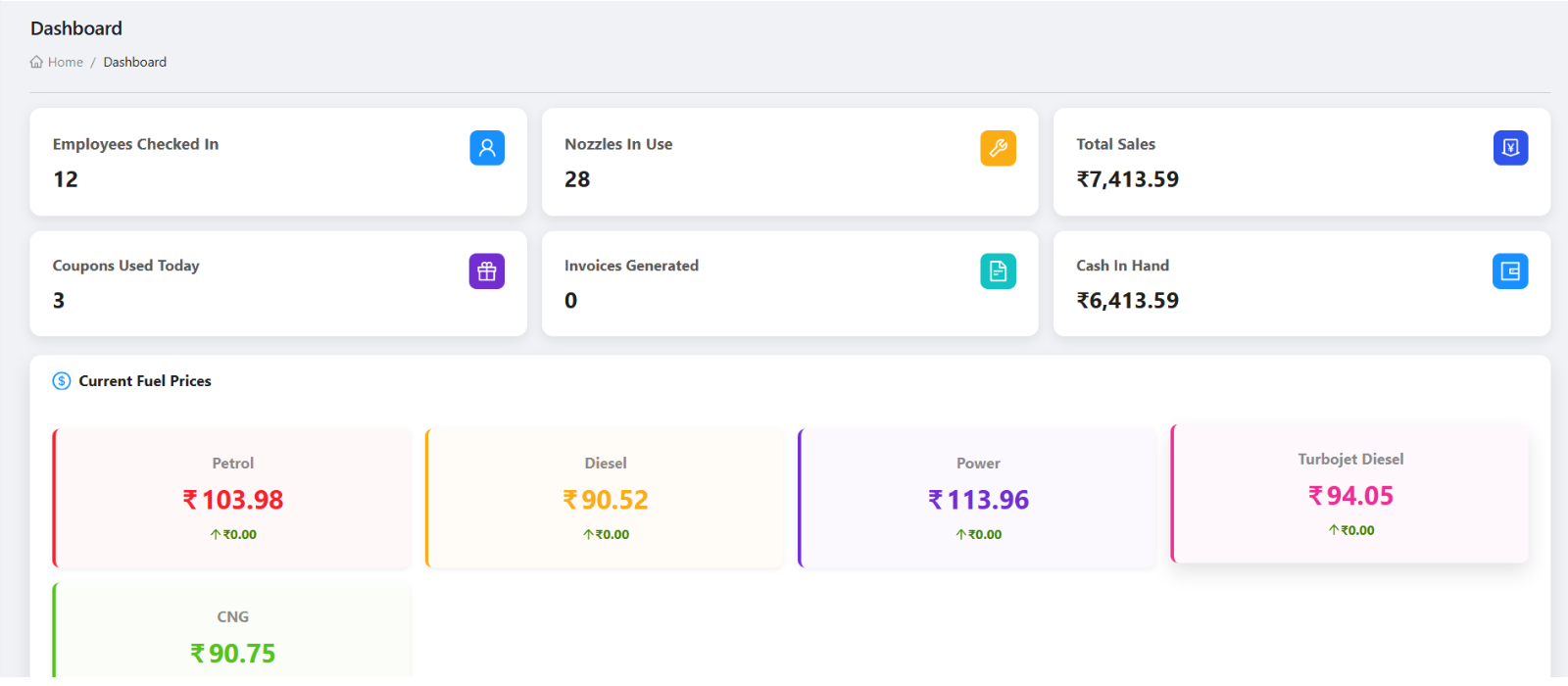
- Uses dashboard from the existing static image set.
Start with web setup
Use the web dashboard for company setup, master data, users, roles, fuel types, tanks, nozzles, card machines, shift timings, customers, and opening operational checks. The larger screen is better for accuracy and review.
Verify mobile access
After user and role setup, ask key users to log in to the mobile app, confirm approval and base data load, and check that the right menus are visible for their role.
Test one daily workflow
Before full go-live, run a test flow for shift check-in, current shift review, DSR or sales entry, customer or coupon activity, and invoice review. This reveals missing setup before real data accumulates.
Assign admin ownership
Decide who will maintain users, roles, settings, shift timings, fuel setup, inventory setup, and tanker setup. Keep owner-level access limited to trusted users.
Review reports at the end of the first week
Owners should check dashboard numbers, daily operations, DSR, invoices, outstanding balances, stock, density, and task activity to confirm the platform is being used consistently.
First week setup checklist
How Petrodweep supports first-week rollout
- Petrodweep keeps initial setup strongest on the web dashboard while giving mobile users enough access to verify real daily operations.
- The workflow connects setup, permissions, shifts, billing, stock, and reports so new users understand the platform as one system.
- This page is intentionally cross-platform because first-week rollout is not a single screen or single module.
Frequently asked questions
Should first-time setup be done on web or mobile?
Use the web dashboard for most first-time setup because it is easier to review master data, users, roles, and reports. Use mobile to verify staff access and day-to-day workflows.
What should be checked before going live?
Check master data, role permissions, mobile login, shift timings, fuel setup, nozzles, customer setup, invoice flow, and owner reports.
Why is this not only a setup page?
First-week success depends on setup plus mobile access, staff roles, first workflow testing, and owner review.